





Archive for the ‘Internet Love’ Category

living
media

Getting Myself to the Project Priceless Wedding


So yes, I did get invited to a virtual stranger’s wedding, as I shared in yesterday’s post. (Although, theoretically, she’s not a “virtual” stranger because we chit-chat virtually, I just don’t know her in real life.)

When Jordan sent me the details about the Project Priceless wedding, the only thing that registered in my head was the date: August 22nd. I couldn’t recall anything already scheduled for that date, so I just replied “yes” right away to her email. And then I told Hubby that he was coming to a wedding with me sometime at the end of August.

Weeks pass and I realize that the wedding is fast approaching. My way of coping with the multi-taking world of working motherhood is to function on a “need to know basis.” This system helps keep the clutter out of my brain. What this means is that I didn’t figure I needed to know all the details about the wedding locale and time before accepting. I only needed to know that information the day before, or maybe even on the day of, to get myself there on time and to the right location.

This “need to know basis” of filing info in my brain works 9 out of 10 times. Unfortunately, this was going to be one of those times when the system failed me.

I dug through my emails and pulled out the invitation. Oh. Oh dear.

I had assumed that the wedding would take place on a Saturday and the reception would be in the evening. But that is a traditional wedding. Not a project priceless wedding! Of course, with everything for the wedding being a donation from the community, the day of the week and the time weren’t going to be when all the other paying customers have their weddings booked. I hadn’t thought of that at all. The wedding was scheduled for a Monday night. Oops, Hubby wasn’t going to be able to be my date after all. I quickly shot off an email to Jordan begging her not to scream or cry, but that I was going to have to muck with her table settings. She took it well. Or at least she took it with a shot of vodka (who’s to know really, since I don’t actually know her that well, remember?).

Okay, next challenge was that the ceremony was scheduled for 5 pm. Oh, 5 pm. Hmm … I guess I could get to work at 8 and leave at 4 and still manage to pull it off.

Nope. One more detail that I hadn’t noted in my lovely “need to know” system — the location was in Edwards. More than a full hour’s drive from my office in Kanata.

Alrighty, then. I’ll need to do a quick change at work and leave at 3:30 pm. Not ideal, because the deliverables at the office will still need to be delivered, which means extra hours for me in the evening.

All in all, I was getting pretty irked at my “need to know” system. But I’d already committed to attend, so I was just going to have to make this work.

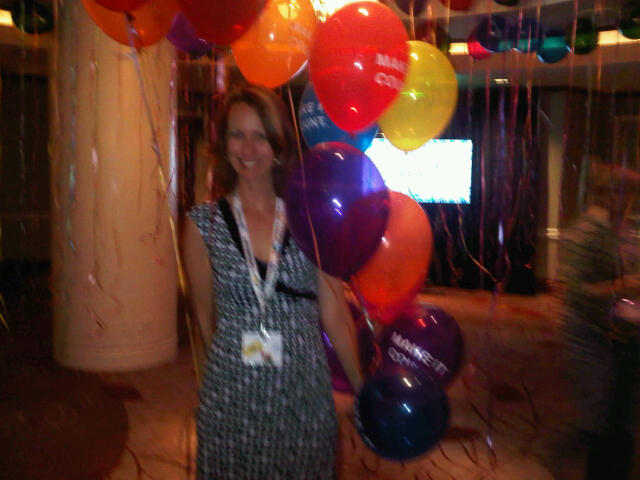
So as 3:30 pm on Monday hit, I slipped out of the office and to the women’s washrooms. Here is the before:

I have thrown a striped jersey jacket over a little black dress. Normally, I would never show the knees in the office, but what the heck, I needed a quick change! To make up for the skin show, I had slipped on some cute, but conservative, shoes and hoped no one would notice the difference.

All I had to do was take off the jersey, throw on a silky shawl (which has great karma since it was from my BFF’s wedding when I was one of her bridesmaids ten years ago) over top of the dress and then change shoes (more great karma since I bought these three months after my son was born to wear to another excellent couple’s wedding in Australia).

All in all, the quick change worked out just fine. Unfortunately, there is nothing “quick” I can do about those bags under my eyes though!

With the quick change complete, I rushed back out to my car only to realize that I’d left the driving directions up at my office. I was not going to go back to the office all decked out — especially at 3:30 pm! So, I made an emergency call to Hubby to google-up some directions for me.

I finally took off on my way, but as the minutes in the drive passed, I was started to sweat thinking I was going to arrive late — right in the middle of the ceremony … you know, “Does anyone have any objections?” and out comes Julie stumbling in her heels from the parking lot. Not a good vision, let me tell you!

As I was starting getting close, the road turned into a dirt road. Oh oh, I hope I didn’t take a wrong turn! Eventually I saw with relief the sign to Stanley’s Old Maple Lane Farm, where the wedding was going to be held. I turn the wheel into the drive only to realize that the gate is closed. Gah! A panicked swinging of the head suggested that the next lane up was the one for me. As I start to back up, a blonde woman in grey Prius starts turning into the same laneway right behind me. I start laughing like a crazy lady …

The cute blonde in the Prius is my co-tweeter for this event: Andrea from a peek inside the fishbowl. And she looks like she’s just as anxious as me that she’s going to arrive in the middle of the ceremony too!

But alas, we arrive, and the whole scene is a picture of calm on the farm. It seems the ceremony isn’t starting until 5:30 pm! We take a few deep breaths, and get ourselves ready for our roles as live-tweeters.

photo credit: Andrea Tomkins

To be continued …. (in the meantime, you can check out Andrea’s post on the Project Priceless wedding) …..


media

The Project Priceless Wedding (alternate title: I’m going to a stranger’s wedding tonight and will have my face in my BlackBerry the whole time)


Hubby is, how shall we say, an “analog” man. By choice, he does not use a cell phone, uses email only sparingly, and does not engage in any social media sites. So, needless to say, he finds my fascination with my BlackBerry, blog and twitter account somewhat baffling. But I think this latest development really takes the cake in his mind.

Tonight, I’m attending a stranger’s wedding and I’ll be live-tweeting it the entire time. Here’s how he noted this on our family calendar:

So, yes, I am going to “someone’s” wedding.

Well, to be fair, the bride is not a complete stranger. I did speak with her for about 15-20 minutes at the Social Capital Conference, and introduced her to you in my recap post of that event. That’s right — it’s Jordan, and the Project Priceless wedding.

In keeping with her and finance’s social media focus, she’s asked a few local bloggers to attend the wedding and “cover it” by live-tweeting. Sure, it’s a little unusual, but whatever. I’ll be there. I’ve got my heels waiting for me in the car for when I slip out of the office, and they’re a shiny black patent — you know, to match with my central accessory: my smart phone.

If you’d like to follow along, the twitter hashtag for the wedding is #ppwedding and start time is 5pm. No worries if you don’t have a twitter account, Jordan explains how you can follow along.


living
family
media

#SoCapOtt: Ottawa’s first (annual!) Social Capital conference


I spent one of my only free days of the week at an all-day conference, paid for out of my own pocket. Insanity? My Hubby might agree. But I, for one, was certainly not going to miss Ottawa’s first social media conference! Organized by a smart group of folks who I all consider to be my friends due to our connections on Twitter and via blogging, I was also there to support their efforts and help keep the attendance numbers high. Well, I needn’t have worried. The conference, which had an attendance cap of 150, was completely sold out. And by lunchtime, the participants were already talking of “next year.”

No doubt, excellent recaps of this event will be created (check out By the Brooks for a recap/review post, Nolie’s Place for top tips learned at the event, and Keep Your Head Up‘s liveblogging for a detailed experience), so I feel freed-up to simply share some of my own personal best moments of the conference.

IRL peeps

For social media nerds like me, “IRL” means “In Real Life.” And the IRL experience was the most fulfilling part of the day for me. (It’s not always this way … sometimes I like the virtual person much better than the IRL person!)  Yesterday, I had a chance to meet some online folks that I’ve been following for ages. This included Joe Boughner, Kathy Buckworth, Glen Gower, and Nick Charney.

But Social Capital also gave me the pleasure of meeting some brand new faces. Here are a few that immediately come to mind:

Sarah Wilson (aka Miss Ability)

I ended up at the same table for lunch with a woman named Sarah. Petite and soft-spoken, she had a quiet confidence that intrigued me. So, we got to talking and I had the opportunity to hear about her newly launched business called Miss Ability.

Sure, people are launching their own businesses every day, but my experience is that so many people don’t launch their businesses well. They print up cards at Staples or in their own home office, start handing them around and wonder why no one is taking an interest.

Sarah, on the other hand, is the kind of new business owner that I really respect. She has been doing all the prep work to ensure her company is well-branded and professional from the start. Here’s her business card:

Sarah had a good “elevator pitch,” that immediately helped me understand her business concept. And if you check out the Miss Ability website, you can see that the business has a clear mission statement:

To give people a platform, whether disabled or not, to communicate.  Also, to allow the disabled community the ability to have a lifestyle they feel they deserve. Promoting affordability and reducing time constraints I’m providing options that are affordable and attainable at any income level or class; whether you are upper, middle or lower.

So, yeah, she was really cool. That made my $75 entry to the conference worthwhile already. Then I met:

Jordan from Project Priceless

I was immediately drawn to Jordan because I wanted to check out her shoes. Yes, I love shoes and she was rockin’ some mighty cute ones! But her shoes were just the tip of the ice berg — she has a really unique style about her. And her sparkling smile didn’t hurt one bit either.

Her story was fun. Her fiance Brian and she launched a project called “Priceless” — a “free” wedding experiment.

Can they beg, borrow, and get donations all the way to the alter?

Although this project and the blog that keeps it all tied together have attracted a lot of media attention, I had not yet heard about it. Clever and so creative, Jordan and her project reminded me of something my younger (“baby”) sister would do. I had a wonderful time talking weddings, dresses, and the Slice channel with her and a number of other women at the table. Here is a photo of Jordan and Brian, proudly displaying their wedding tattoos, which were traded for services with Sarah Rogers of Living Colour.

Jordan and Brian have their wedding scheduled for this August 22nd and you can bet that I’ll be following along and wishing them well! So, yeah, more Ottawa-cool. Then I met:

Ward Minnis, producer of the play The Cabinet

I walked into one of the sessions late and grabbed the only seat I could see. During the session, the man on the left of me asked a question, and then after the session, he and a group of us were chatting for a bit. As it turns out, he has just produced his own play called The Cabinet, which is a political comedy set in the fictional Archipelago Islands. The play premiered April 1st, 2011 and ran for 12 shows in Ward’s home town of Nassau. Here is a promotional poster for The Cabinet:

As a fellow writer, I shared a chuckle with him about his twitter bio. It reads:

Writing stories and trying to make a living off of it. Yes, I am crazy.

He was a really likeable guy, and very modest about his accomplishment of pulling off the production of his very own play. I’ve since checked out his About Me page and he’s got a lot going on! From plays, to visual art and graphic design, to academics and opinion essay writing — this is one interesting person. I really hope his next play will be set in Ottawa!

So, thank you so much to Social Capital for this event, without which I never would have had the fortune of meeting Sarah, Jordan and Ward! I am really looking forward to this becoming an annual event. (Gee, no pressure, eh?)

Otherwheres and other news on the Internets:

Social Capital is featured in today’s Citizen; Coffee with Julie is included in a Canadian Family magazine’s list of favourite bloggers; and Stella’s camping tips have been used in a “flashback” post on the Kids in the Capital community blog.


living
media

QR Codes: Like a Bar Code, but Better!


Have you noticed these black and white boxes showing up everywhere these days?
 
From magazine advertisements, to business cards and even on massive outdoor signage, these boxes are called “QR Codes,” which is short for Quick Response code. Like a bar code, but with the ability to hold up to double the number of alphanumeric characters, QR codes are rapidly becoming the latest marketing darling. I recently had a chance to learn more about these at BlogWorld NY’s Social Media Summit for Business (#BWENY) and I have to admit I am quite captivated by their potential.
 
How do they work?
If you see a QR code on any kind of printed material, you can scan it with a smart phone and in doing so, have access to detailed information.
 
So, in a highly practical example, a sealed container in a manufacturing facility could have a QR code label on it which could be easily scanned to provide employees with instant access to the MSDS sheet for how to safely handle and dispose of the material.

***********

QR Code Example:
 
QR Codes Used to Help Clean Up the Gulf
Here, a QR Code is used to gather signatures for a petition to clean up the Gulf.
 
**********
 
How are marketers using QR codes?
There’s been a massive explosion in the use of QR codes by marketers. And rightly so … these little boxes can be so handy in so many ways when it comes to keeping a sales lead’s interest.
 
Just imagine you’re driving down the street and see a “for sale” sign on a house that looks interesting. The real estate agent can satisfy your immediate interest by letting you scan a QR code that leads you right to a dedicated site with photographs and information.

*********

QR Code Example:
 
Here, this retailer lets you check out reviews of the product while you’re standing in the aisle trying to decide.  

*********

You’re doing it wrong!
But like many new fads with large bandwagons, some folks are so excited to use a new tool that they haven’t thought about how or why it should be used.
 
Like any kind of marketing or communications, the audience and end-objective need to be considered at the outset. In the example above with the real estate agent, the audience is a person in his/her car (perfect!), who wants detailed information right now (perfect!), so that they can decide if this is a house he/she might want to buy (perfect!).
 
But what about an automobile advertisement in an airline magazine that links you to their website’s homepage? The audience probably can’t access their cell phone in the air (boo!), is going to lose interest as soon as they click through to land on a generic homepage instead of something specific to the car in the ad (boo!), and has no clear call to action (yep, boo!).
 
Above all else, mobile is a must
One thing that Jason Pinto of interlinkONE, the leader of a session on QR codes at BlogWorld (you can download his presentation here), stressed was that whatever or whereever your QR code takes a user to, it MUST be optimized for a mobile phone.
 
And this is where most companies fall down … forgetting the critical importance of bringing a cell phone user to a mobile-optimized page. This means that it’s just not enough to slap your company’s website address on a QR code and hope for the best. It’s your brand and when you bring someone to a site that doesn’t work, you are associating your brand with frustration.
************

How about you? Interested in trying out QR codes, then check out these step-by-step instructions by clicking this link. Have you already scanned QR codes before –  how was your experience with them? (Hey … I’m doing a poll on facebook, via a reader suggestion).

********


media

Getting your feet wet with LinkedIn


Despite the constant use of the words “social media” in every second conversation these days, a very large proportion of people have not yet taken the plunge. I don’t blame them, frankly, because even just the term “social media” is starting to grate on me too and I’m a big fan!

But if you think you might like to get your feet wet, I think that LinkedIn is a good place to start. It takes very little time and the “unwritten rules” of engagement are pretty straightforward. Now, I’m not just talking about setting about a basic account and then calling it a day … I’m talking about logging in to LinkedIn regularly and actively engaging via status updates, group discussions and Q&As. So from my little coffee spot, here’s the things I think you need to know before you get wet:

#1: Provide value

While it’s completely acceptable on twitter to note what you’re having for lunch, the folks on LinkedIn are generally “all business, all the time.” This means that if you’re going to post a status update or start a discussion, it should add value. If your update can help others improve knowledge or skills, build their businesses, do their jobs, solve problems, or understand networked video connectivity better — then it’s adding value. 

#2: Write what you know 

In follow-on to rule #1, your best bet for status updates and joining in on group discussions is to stick to your own particular area of professional expertise.

#3: Don’t push products 

It’s perfectly fine to share a link to your company’s news release in your status update, but the minute you go into a group discussion and start promoting a specific product to the other members, they will “turn off” immediately. The unwritten code in group discussions is to share expert advice and knowledge, but not to sell anything.

#4: Be careful with your opinions 

There is a fine line between a healthy debate and an incendiary reaction. A “flame war” can spark up online easier than anywhere else and once it gets going, it’s really hard to stop it. So it’s best to be careful and respectful. Before pressing “publish,” a good litmus test is to ask yourself: “Would I say these exact same words out loud, and to someone’s face, in a business meeting?”  

#5: Don’t overdo it:

Remember, LinkedIn is not Facebook or Twitter. As I noted in #1, its users are generally strictly for business. For this reason, I don’t personally recommend updating your status in LinkedIn more than once a day. As for the automation feature that allows your Twitter steam to be automatically posted into your LinkedIn status, I wouldn’t do it unless you tweet very infrequently and almost exclusively about business-related subjects.

**************

It’s a new world, but the old rules still apply

Unlike the world I grew up in, there is no longer a clean line between your personal life and your professional life. That’s because google and all of its social media cousins make it so simple for anyone to find out where you work. What that means, for example, is that if I join in on a group discussion on LinkedIn, the other group members are only one click away from seeing only my name to seeing who my employer is.

This ultra-connected world we live in now is new for everyone, so mistakes are bound to happen. But just because it’s a new world out there online, I still think the age-old mother’s advice applies really well: “If you make a mistake, say you’re sorry” and “If you don’t have something nice to say, then don’t say anything at all!

Related Posts Plugin for WordPress, Blogger...